.png?width=300&height=71&name=original_logo(L).png)
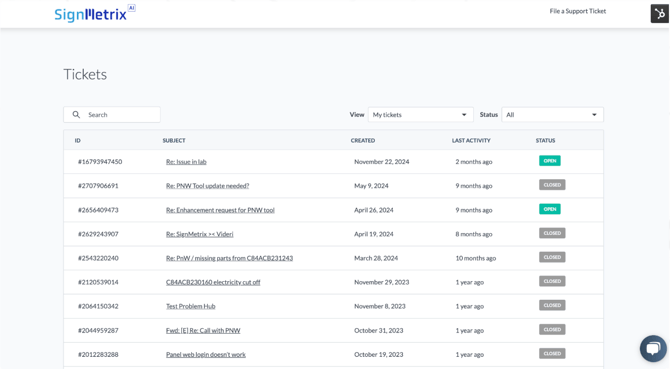
Our customer support is powered by HubSpot Service Hub Professional, giving you multiple ways to get help and stay informed.
Key Features
Our support infrastructure includes a Customer Portal where you can track and manage your tickets in real time, a Knowledge Base filled with self-service resources so you can find answers on your own, Customer Feedback Surveys that help us continuously improve based on your input, and a full-featured Help Desk with ticketing and automation to ensure issues are resolved efficiently.
Service Level Agreements (SLAs)
We stand behind our support with clear commitments: guaranteed response times based on issue severity, with resolutions typically provided within 24 to 72 hours, and a 99.5% uptime guarantee.
Support Tiers
Our support is structured into three levels to ensure every issue reaches the right expertise:
Level 1 Support: Initial troubleshooting and resolution of common issues. Handles basic inquiries and system guidance.
Level 2 Support: Advanced diagnostics for more complex issues requiring in-depth technical expertise.
Level 3 Support: Escalation to system architects or engineers for resolving critical, system-wide, or highly complex problems.
Support Packages
1) Standard Support (5 × 9)
Technical support remains active throughout the customer’s subscription term.
All SignMetrix subscription packages include continuous updates and email support at no additional cost.
2) Gold Package (7 × 12 Online Monitoring)
Provides 7-day / 12-hour remote monitoring and operational support.
Includes device and sensor health monitoring, incident detection, remote diagnostics, troubleshooting, and customer coordination during covered service hours.
Designed for customers requiring extended business-hours operational support beyond the standard subscription package.
3) Platinum Package (7 × 24 Online Monitoring)
Provides 24/7 remote monitoring and priority operational support.
Includes continuous infrastructure monitoring, priority incident response, advanced remote diagnostics, troubleshooting, and escalation management for enterprise-scale deployments.
Designed for customers requiring mission-critical, always-on operational continuity.
How to submit a support ticket?
Technical Support Contact Email
Customers can contact the SignMetrix Support team via email for all technical inquiries, issue reporting, and general support needs. Requests submitted via email are logged, triaged, and assigned based on severity and operational impact.
- Send an email to support@signmetrix.com with a clear description of the issue
- Include relevant details such as device ID, location, timestamps, and screenshots if applicable
- The support team will acknowledge receipt and assign the request based on priority level
Support Ticket Submission
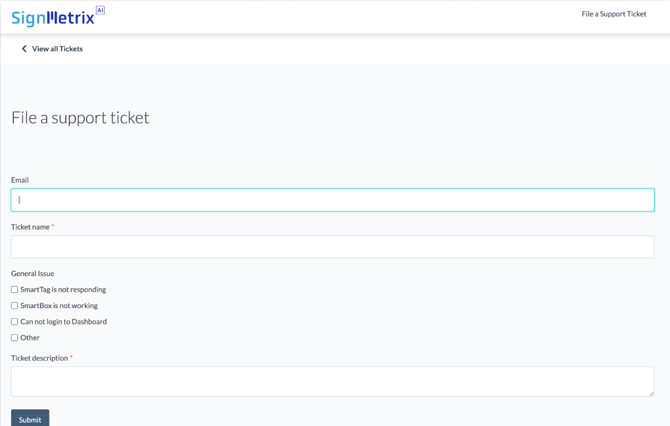
The SignMetrix Support Portal is the primary channel for submitting and managing support requests. It ensures structured intake, prioritization, and full lifecycle tracking of all issues.
- Navigate to: https://signmetrix.com/support
- Select “Submit a Request”
- Provide required details including:
- Issue description and business impact
- Affected devices, sensors, or locations
- Time of occurrence and reproducibility
- Attach logs, screenshots, or diagnostic files if available
- Submit the ticket
Once submitted:
- A ticket ID is generated for tracking
- The request is categorized by severity and routed to the appropriate support tier
- Customers can monitor status, provide updates, and communicate directly with the assigned support engineer