.png?width=300&height=71&name=original_logo(L).png)
Overview
This feature is designed for customers who restrict direct internet connectivity to a limited number of BrightSign players.
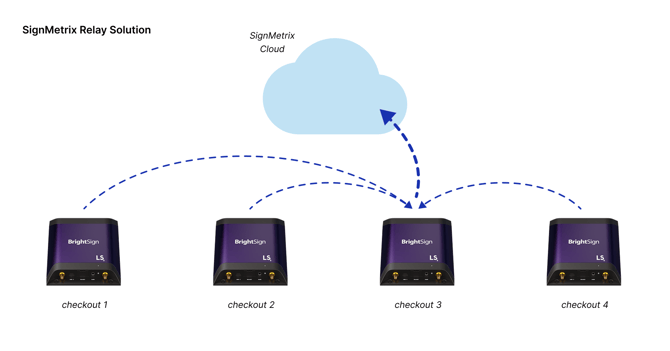
SignMetrix Edge Relay enables BrightSign players to transfer measurement data through a single device, rather than requiring each player to connect directly to the internet.
Players communicate over the local network, and selected devices securely forward the data to the SignMetrix Cloud. This approach simplifies network requirements and aligns with enterprise IT policies.
Key Benefits
- Reduces the number of internet-connected devices
- Supports deployments in restricted network environments
- No additional hardware required
- Enables flexible device-to-device communication over LAN
- Provides built-in redundancy with multiple relay devices
- Maintains reliable data delivery with buffering and retry logic
How It Works
SignMetrix Edge Relay allows BrightSign players to share measurement data within the local network before sending it to the cloud.
- Each player collects measurement data locally
- Players send data to the relay player over LAN (Ethernet or Wi-Fi)
- Relay player forwards the data to the SignMetrix Cloud via HTTPS
Note:
A BrightSign player can act as both a client and a relay at the same time.
Device Roles
| Role | Description |
|---|---|
| Client | Collects measurement data and sends it to a relay device |
| Relay | Receives data from other devices and forwards it to the cloud |
| Hybrid | Acts as both client and relay simultaneously |
Data Flow
- Player collects measurement data (e.g., presence, dwell time)
- Data is stored locally on the device
- Data is sent to a relay device over the local network
- Relay device aggregates and queues incoming data
- Relay device sends data to SignMetrix Cloud via HTTPS
- Data is processed and displayed in the dashboard
Functional Behavior
Client Node Behavior
- Detects and collects audience measurement events
- Stores events locally with buffering enabled
- Reads relay node IP from registry or configuration
- Sends data to the relay node over the local network
- Automatically retries if the relay is unavailable
- Switches to a secondary relay if configured
Relay Node Behavior
- Receives data from multiple client nodes
- Posts incoming data to the SignMetrix Cloud, Customer Cloud via HTTPS or On- Premise Server.
Configuration
Edge Relay is configured through SignMetrix Device Management.
Example Configuration
SecondaryRelayIP = 192.168.1.11
Mode = Client / Relay / Hybrid
Configuration Notes
- Multiple relay devices can be defined
- Devices automatically switch to a secondary relay if needed
- Configuration can be deployed remotely across all devices
Failover Behavior
- Devices first attempt to send data to the primary relay
- If the primary relay is unavailable, devices switch to a secondary relay
- If no relay is reachable, data is stored locally
- Stored data is sent automatically once connectivity is restored
Network Requirements
Client Devices
- No internet connection required
- Must be connected to the same local network
Relay Devices
- No inbound ports or firewall changes required
Security Considerations
- Outbound-only communication model
- TLS-encrypted data transmission
- No collection of personally identifiable information (PII)
- Reduced external network exposure
When to Use Edge Relay
Edge Relay is recommended when:
- Direct internet access is restricted across devices
- IT policies limit the number of internet-connected endpoints
- A simplified and controlled network architecture is required
- Deployment scale requires efficient bandwidth usage
Limitations
- At least one relay device must have internet connectivity
- All devices must be on the same local network
- A proper relay configuration is required for redundancy
Summary
SignMetrix Edge Relay allows BrightSign players to transfer measurement data efficiently without requiring internet connectivity on every device.
By using local communication and relay-based forwarding, it reduces network complexity while maintaining secure and reliable data delivery.