.png?width=300&height=71&name=original_logo(L).png)
Before You Begin
- BrightSign Player must have the SignMetrix BrightSign Extension version 1.4 or later
- At least one BrightSign Player must be configured as a Relay Node
- Sender players and Relay Node must be on the same local network or have network visibility
- The Relay Node must have outbound internet access to communicate with SignMetrix Cloud
The system has two important parts working together:
1. Relay Server (on BrightSign)
- Acts as a middleman
- Receives requests from clients
- Forwards them to the real server
2. API Manager (Api class)
- Decides which backend server to use
- Can switch between multiple servers if needed
2. Full System Flow
CLIENT → BRIGHTSIGN (Relay Server) → API SERVER (selected by Api class)
- Relay = handles traffic
- Api class = decides destination server
3. Relay Server
- Runs on BrightSign
- Activated by configuration
- Listens on a port (example: 9001)
- Clients send requests to it
4. API Server Management
The system can use more than one backend server.
Example configuration:
config_api_server = https://server1.com,https://server2.com
- Server 1 = primary
- Server 2 = backup
4.1 What Does the Api Class Do?
It:
- Keeps a list of servers
- Uses one server at a time
- Switches to another if there is a problem
4.2 How Server Selection Works
At startup:
- First server in the list is used
Active server = server1
If network problem happens:
- System waits a short time (cooldown)
- Then switches to next server
server1 → switch → server2
Important Rule:
It does NOT switch too often
- Minimum wait time: 2 minutes
This prevents constant switching.
4.3 When Does the Server List Change?
When this config changes:
config_api_server
The system automatically:
- Reloads the server list
- Switches to the first server
- Updates Relay behavior
4.4 What Happens When the Server Changes?
When switching:
- Active server URL is updated
- User/session login be cleared
- System continues with new server
5. How Relay + API Work Together
Step-by-step:
- Client sends request to BrightSign
- Relay Server receives it
- Api class decides target server
- Request forwarded to selected server
- Response returned to client
6. Activation Flow
REGISTRY CONFIG
|
v
AppConfig
|
v
----------------------
| Relay Server |
| (ON / OFF) |
----------------------
|
v
----------------------
| Api Class |
| (Server Selection) |
----------------------
7. Technician Checklist
A. Required Settings
registry write signmetrix config_relay_enable true
registry write signmetrix config_relay_port 9001
registry write signmetrix config_api_server https://server1.com,https://server2.com
B. What Happens After Setup
- Relay Server starts
- First server becomes active
- Clients can connect
C. Server Failover (Automatic)
If server1 fails:
Wait ~2 minutes → switch → server2
No manual action needed
8. Example Scenario
Config:
config_api_server = https://a.com,https://b.com
Flow:
- Start → uses a.com
- Network fails
- Wait 2 minutes
- Switch → b.com
- Continue working
9. Simple Analogy
Think of the system like this:
- Relay Server = Receptionist
- Api class = Decision maker
- Servers = Offices
Receptionist receives requests
Decision maker chooses which office to send them to
If one office is closed → sends to another
10. Final Summary
- Relay Server handles incoming traffic
- Api class handles which server to use
- System supports:
- Multiple servers
- Automatic failover
- Dynamic configuration
Sample 2 Relay Server Configuration
BS 01:
registry write signmetrix config_api_server http://192.168.1.100:9001,http://192.168.1.101:9001
BS 02:
registry write signmetrix config_api_server http://192.168.1.100:9001,http://192.168.1.101:9001
BS 03:
registry write signmetrix config_api_server http://192.168.1.100:9001,http://192.168.1.101:9001
BS 04:
registry write signmetrix config_api_server http://192.168.1.101:9001,http://192.168.1.100:9001
BS 05:
registry write signmetrix config_api_server http://192.168.1.101:9001,http://192.168.1.100:9001
BS 06:
registry write signmetrix config_api_server http://192.168.1.101:9001,http://192.168.1.100:9001
Relay Server 1: (192.168.1.100)
registry write signmetrix config_relay_enable true
Relay Server 2: (192.168.1.101)
registry write signmetrix config_relay_enable true
Description:
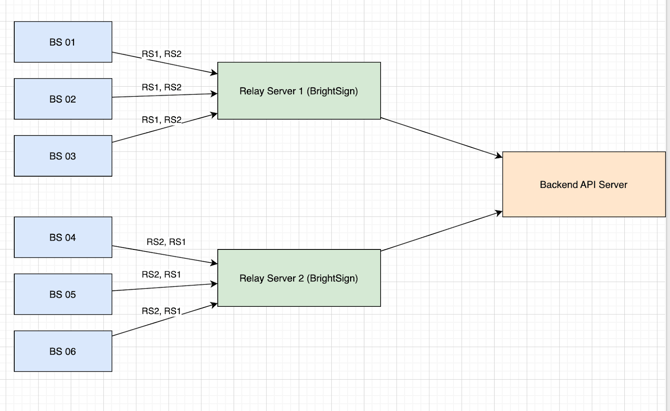
In this configuration, there are 2 BrightSign relay servers and 6 BrightSign clients. All clients can communicate with both relay servers.
- BS 01, BS 02, and BS 03 primarily send requests through Relay Server 1.
- BS 04, BS 05, and BS 06 primarily send requests through Relay Server 2.
If one of the relay servers goes offline, the other relay server will automatically handle and forward all requests from all 6 clients.
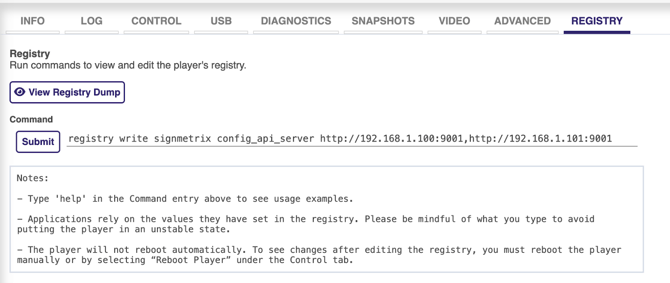
You can enable SignMetrix Relay over the Diagnostic Web Server or the SignMetrix Dashboard Device Management Panel.
From the Registry tab, enter the command and click the submit button.